").attr(n.scriptAttrs||{}).prop({charset:n.scriptCharset,src:n.url}).on("load error",i=function(e){r.remove(),i=null,e&&t("error"===e.type?404:200,e.type)}),C.head.appendChild(r[0])},abort:function(){i&&i()}}});var Jt,Kt=[],Zt=/(=)\?(?=&|$)|\?\?/;ce.ajaxSetup({jsonp:"callback",jsonpCallback:function(){var e=Kt.pop()||ce.expando+"_"+jt.guid++;return this[e]=!0,e}}),ce.ajaxPrefilter("json jsonp",function(e,t,n){var r,i,o,a=!1!==e.jsonp&&(Zt.test(e.url)?"url":"string"==typeof e.data&&0===(e.contentType||"").indexOf("application/x-www-form-urlencoded")&&Zt.test(e.data)&&"data");if(a||"jsonp"===e.dataTypes[0])return r=e.jsonpCallback=v(e.jsonpCallback)?e.jsonpCallback():e.jsonpCallback,a?e[a]=e[a].replace(Zt,"$1"+r):!1!==e.jsonp&&(e.url+=(At.test(e.url)?"&":"?")+e.jsonp+"="+r),e.converters["script json"]=function(){return o||ce.error(r+" was not called"),o[0]},e.dataTypes[0]="json",i=ie[r],ie[r]=function(){o=arguments},n.always(function(){void 0===i?ce(ie).removeProp(r):ie[r]=i,e[r]&&(e.jsonpCallback=t.jsonpCallback,Kt.push(r)),o&&v(i)&&i(o[0]),o=i=void 0}),"script"}),le.createHTMLDocument=((Jt=C.implementation.createHTMLDocument("").body).innerHTML="
",2===Jt.childNodes.length),ce.parseHTML=function(e,t,n){return"string"!=typeof e?[]:("boolean"==typeof t&&(n=t,t=!1),t||(le.createHTMLDocument?((r=(t=C.implementation.createHTMLDocument("")).createElement("base")).href=C.location.href,t.head.appendChild(r)):t=C),o=!n&&[],(i=w.exec(e))?[t.createElement(i[1])]:(i=Ae([e],t,o),o&&o.length&&ce(o).remove(),ce.merge([],i.childNodes)));var r,i,o},ce.fn.load=function(e,t,n){var r,i,o,a=this,s=e.indexOf(" ");return-1").append(ce.parseHTML(e)).find(r):e)}).always(n&&function(e,t){a.each(function(){n.apply(this,o||[e.responseText,t,e])})}),this},ce.expr.pseudos.animated=function(t){return ce.grep(ce.timers,function(e){return t===e.elem}).length},ce.offset={setOffset:function(e,t,n){var r,i,o,a,s,u,l=ce.css(e,"position"),c=ce(e),f={};"static"===l&&(e.style.position="relative"),s=c.offset(),o=ce.css(e,"top"),u=ce.css(e,"left"),("absolute"===l||"fixed"===l)&&-1<(o+u).indexOf("auto")?(a=(r=c.position()).top,i=r.left):(a=parseFloat(o)||0,i=parseFloat(u)||0),v(t)&&(t=t.call(e,n,ce.extend({},s))),null!=t.top&&(f.top=t.top-s.top+a),null!=t.left&&(f.left=t.left-s.left+i),"using"in t?t.using.call(e,f):c.css(f)}},ce.fn.extend({offset:function(t){if(arguments.length)return void 0===t?this:this.each(function(e){ce.offset.setOffset(this,t,e)});var e,n,r=this[0];return r?r.getClientRects().length?(e=r.getBoundingClientRect(),n=r.ownerDocument.defaultView,{top:e.top+n.pageYOffset,left:e.left+n.pageXOffset}):{top:0,left:0}:void 0},position:function(){if(this[0]){var e,t,n,r=this[0],i={top:0,left:0};if("fixed"===ce.css(r,"position"))t=r.getBoundingClientRect();else{t=this.offset(),n=r.ownerDocument,e=r.offsetParent||n.documentElement;while(e&&(e===n.body||e===n.documentElement)&&"static"===ce.css(e,"position"))e=e.parentNode;e&&e!==r&&1===e.nodeType&&((i=ce(e).offset()).top+=ce.css(e,"borderTopWidth",!0),i.left+=ce.css(e,"borderLeftWidth",!0))}return{top:t.top-i.top-ce.css(r,"marginTop",!0),left:t.left-i.left-ce.css(r,"marginLeft",!0)}}},offsetParent:function(){return this.map(function(){var e=this.offsetParent;while(e&&"static"===ce.css(e,"position"))e=e.offsetParent;return e||J})}}),ce.each({scrollLeft:"pageXOffset",scrollTop:"pageYOffset"},function(t,i){var o="pageYOffset"===i;ce.fn[t]=function(e){return M(this,function(e,t,n){var r;if(y(e)?r=e:9===e.nodeType&&(r=e.defaultView),void 0===n)return r?r[i]:e[t];r?r.scrollTo(o?r.pageXOffset:n,o?n:r.pageYOffset):e[t]=n},t,e,arguments.length)}}),ce.each(["top","left"],function(e,n){ce.cssHooks[n]=Ye(le.pixelPosition,function(e,t){if(t)return t=Ge(e,n),_e.test(t)?ce(e).position()[n]+"px":t})}),ce.each({Height:"height",Width:"width"},function(a,s){ce.each({padding:"inner"+a,content:s,"":"outer"+a},function(r,o){ce.fn[o]=function(e,t){var n=arguments.length&&(r||"boolean"!=typeof e),i=r||(!0===e||!0===t?"margin":"border");return M(this,function(e,t,n){var r;return y(e)?0===o.indexOf("outer")?e["inner"+a]:e.document.documentElement["client"+a]:9===e.nodeType?(r=e.documentElement,Math.max(e.body["scroll"+a],r["scroll"+a],e.body["offset"+a],r["offset"+a],r["client"+a])):void 0===n?ce.css(e,t,i):ce.style(e,t,n,i)},s,n?e:void 0,n)}})}),ce.each(["ajaxStart","ajaxStop","ajaxComplete","ajaxError","ajaxSuccess","ajaxSend"],function(e,t){ce.fn[t]=function(e){return this.on(t,e)}}),ce.fn.extend({bind:function(e,t,n){return this.on(e,null,t,n)},unbind:function(e,t){return this.off(e,null,t)},delegate:function(e,t,n,r){return this.on(t,e,n,r)},undelegate:function(e,t,n){return 1===arguments.length?this.off(e,"**"):this.off(t,e||"**",n)},hover:function(e,t){return this.on("mouseenter",e).on("mouseleave",t||e)}}),ce.each("blur focus focusin focusout resize scroll click dblclick mousedown mouseup mousemove mouseover mouseout mouseenter mouseleave change select submit keydown keypress keyup contextmenu".split(" "),function(e,n){ce.fn[n]=function(e,t){return 0
Google Keepの特徴・使い方
google
2023.09.24
Google Keepの特徴は以下のとおりです。気楽に使えるメモ機能だと思います。
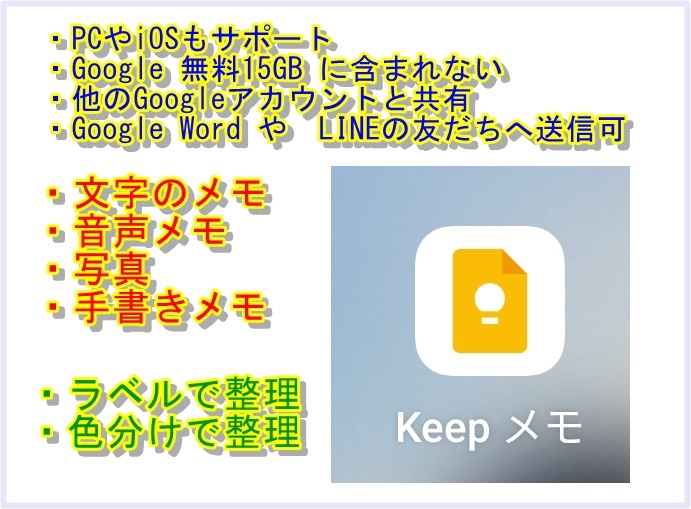
- 異なるOSの端末で 情報共有が出来ます
- PC(Windows、MAC、ChromeOS)、iOS(iPhone)、iPad、Androidスマホ でも使えるので、AndroidスマホとiPhoneで情報を共有したり、スマホで作成してそれをPCで見る、修正する等、複数の端末で同じ内容を見たり、追記、修正ができます。
- Googleの無料15GBにカウントされない (画像は除く)
- Googleの無料容量サービスである15GBにカウントされませんが、画像は無料の15GBを消費するらしい。因みに無料の15GB容量を使うサービスは Gmail、GooglePhotos、GoogleDrive がメインです。
- 20,000文字/メモ が上限。メモの数に上限はない。
- 画像を参照したい場合は、画像のファイル容量を縮小する、画像専用のGoogleアカウントを使う、等の工夫が必要です。動画を残したい場合は Youtube(無料)がお勧めです。
- 他の格納場所のリンクを格納することも出来ます。
- メモ単位で、他のGoogleアカウントと共有
- 作成したメモ単位で、他のGoogleアカウントと共有が出来るので、他人(別のGoogleアカウント)と共同編集が出来ます。ただし、閲覧だけを許可することは出来ない。
- メモを他のアプリへ送れる
- 作成したメモ内容を、他のアプリ(Googleドキュメント、Gmail、LINE等)へ送ることができる。
- 画像から文字抽出ができる
- 格納した画像の中にある文字を抽出してメモに表示することができる。
- 色々な形式が記録できる
- メモが可能なデータとしては、テキスト(文字)、音声、写真、手書きメモ(画像) があります。
動画は扱えませんが将来は可能になるかも知れません。手書きメモも最近機能追加されました。
また音声そのものを記録することは出来ますが、音楽は出来ない様です。あくまでしゃべった内容をメモする機能の様です。但し、しゃべりで空白の時間が(1~2秒位?)出来るとそこで録音が止まってしまいます。
写真として撮影した画像内の文字や手書き文字を検出して、テキストへ変換することも出来ます。更にその文字を翻訳することが出来ます。似たような機能は GoogleLensでも可能です。
- ラベルや色分けで整理ができる
- 作成したメモにラベルを付与して整理したり、色分けで整理することが出来ます。
- 検索ができる
- 作成したメモを、タイトル、メモ内の文字列、ラベル等で検索することが出来ます。
- 文字検索の場合、単語の途中の文字は対象にはならない。(例:山田太郎の場合「太郎」では検索できない。山田 太郎 と間にスペースを入れれば対象になる)
- AND 検索:Google AND めも = Google と めも の両方が含まれるメモが抽出される。
- OR検索:検索文字を間にスペースを入れて入力。Google めも
- 共同編集ができる
- 他のアカウントとメモ単位で共有が出来る。他のアカウントからもメモ内容を編集が可能。
- ラベル
- ラベルで分類が出来るが、ラベル数の上限は100個まで。
- 個人的なヒント
- メモを作成した日付を記録する場合は 2025-11-08 の形式がお勧め。この場合は 2025-10、10-08、-10、-08 でも検索が可能。2025/11/08 形式も同様。- や / は単語区切りとして機能するため? 日付検索が月や日でも可能。また日付があるといつ記載したか 思い出になることもある。
- 後で検索する場合を考えて、似たような言葉、日本語と英語、等 そのメモ内容を検索する時に使いそうな言葉を間に(半角)スペースを入れて記録する。
例:GoogleKeepの説明をしたメモの場合:Google、keep、メモ、めも、memo
コメント